
AI Image Generator: Turn Your Wildest Ideas Into Visual RealityDream it, describe it, and watch your vision spring to life. A top-tier AI image generator turns your plain-text prompt into stunning, one-of-a-kind visuals right on your browser, letting you customize art styles, aspect ratios, and every creative detail to fit your needs. You can tweak settings, refine your ideas, and regenerate endlessly until the final result perfectly matches the vivid picture in your head.Gone are the days when creating professional, eye-catching visuals required advanced artistic skills, pricey design software, or hours of tedious manual editing. Today, text-to-image technology makes creative visualization accessible to absolutely everyone. Whether you’re brainstorming quick creative concepts, designing marketing assets, crafting social media content, or exploring artistic hobbies, an AI image generator can turn your simple thoughts into polished photos, digital art, and illustrations ready for any project.What separates great AI image generators from basic ones is flexibility. Every creator works differently: some have hyper-specific visions locked in their mind, while others start with vague, fuzzy ideas and prefer to build visuals step by step. This is where tools like MagicCanvas stand out from crowded generic platforms. It offers two unique text-to-image generation modes tailored for different creative scenarios: Traditional Mode and Fun Mode, covering every user’s creative habits, no matter your skill level or idea clarity.
Explore Countless Art Styles & Flexible Creation Workflows
Experimentation is the heartbeat of all great creative work. The best AI image generator tools boast dozens of pre-built style options, from photorealistic portraits and cinematic shots to vibrant pop art, soft sketches, minimalist vectors, dreamy bokeh effects, neon aesthetics, and more. You can easily match your visual style to your project, whether you need sleek professional graphics or playful, whimsical artwork.Beyond diverse art styles, top platforms let you adjust aspect ratios freely to fit any usage scenario—square posts for social feeds, vertical stories, wide banners, portrait posters, and everything in between. While most AI image tools only offer a single fixed generation workflow, MagicCanvas elevates the experience with its dual-mode design, perfectly catering to both precise and vague creative ideas.
Traditional Mode: Perfect for Specific, Well-Defined Creative Ideas
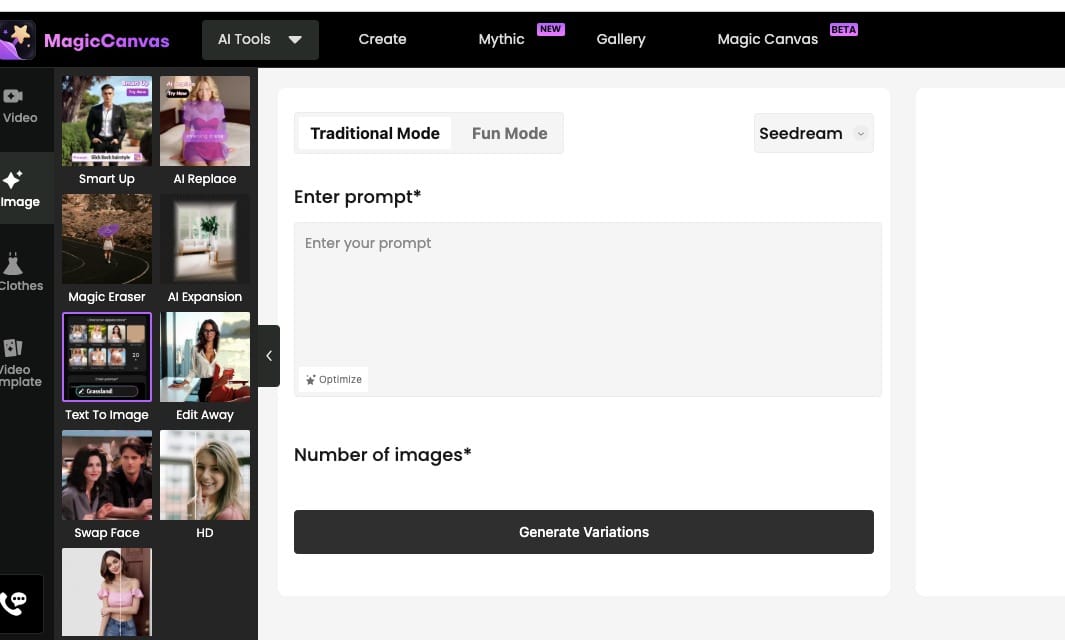
If you’re the type of creator who already has a crystal-clear vision in mind, MagicCanvas’s Traditional Mode is your ideal go-to option. This classic, straightforward text-to-image workflow follows the traditional generation logic most creators are familiar with.You simply need to type out your detailed, specific prompt—including your subject, scene, lighting, mood, art style, and tiny details you want to highlight—and the AI will instantly generate high-quality images based entirely on your description. This mode is made for moments when you know exactly what you want: no extra steps, no distracting preset options, just pure, prompt-driven creation. It’s perfect for professional creators, designers, and anyone with precise creative requirements who wants full, direct control over their AI-generated visuals.
Fun Mode: Ideal for Vague Ideas & Effortless Customization
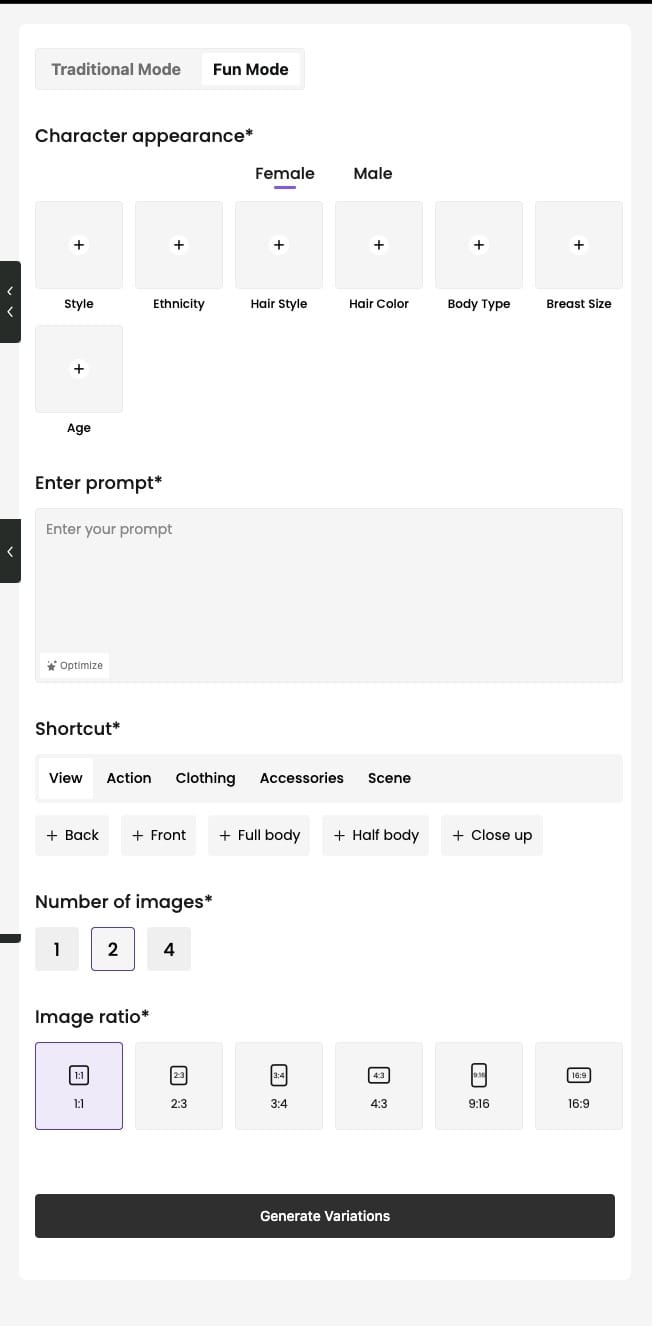
Let’s be real—most of the time, our creative ideas aren’t fully polished. You might have a general concept in mind but struggle to write a detailed, comprehensive prompt from scratch. Staring at a blank prompt box and not knowing how to describe your vision is an all-too-common creative block, and Fun Mode is designed specifically to solve this problem.MagicCanvas’s Fun Mode abandons the single text-input limitation and provides a wealth of intuitive reference options for you to customize freely. You can easily adjust core visual elements including gender, ethnicity, hairstyle, facial features, body proportions, poses, background scenes, and more with simple clicks. No need to rack your brain writing lengthy, complex prompts to describe every tiny detail.This mode is a game-changer for beginners, hobbyists, and creators with fuzzy creative ideas. It lets you build and refine your visual concept step by step through adjustable references, turning vague thoughts into complete, vivid artwork effortlessly. Of course, you can still add custom text prompts to supplement details, blending guided customization and free creation for maximum flexibility.
More Generative Features to Polish Your Visual Projects
Exceptional AI image generation isn’t just about creating a base image—it’s about supporting your entire creative process. Modern creative platforms integrate multiple practical tools to help you finish full projects in one place, and MagicCanvas packs all the essential features you need for seamless creation.You can start your creation from a pure text prompt or upload a reference photo to guide the AI’s style and composition. After generating images via Traditional Mode or Fun Mode, you can further tweak art styles, adjust aspect ratios, and use built-in editing tools to refine colors, lighting, and textures. Whether you need to replace backgrounds, erase unwanted distractions, or enhance image clarity, all editing functions are available right in the workspace.Beyond static image generation, reliable AI creative tools also support custom graphic creation. You can generate exclusive icons, stickers, and illustrations that match your brand tone or personal style, ditching generic stock assets that look repetitive and unoriginal. Some platforms also extend to text-to-video generation, letting you turn simple text descriptions into dynamic short videos with filters and transitions for richer storytelling.
Safe, Accessible AI Creation for All Creative Levels
Creativity should be fun, simple, and safe for everyone. The best AI image generator platforms prioritize user experience and content safety, with automated review systems for input prompts to prevent inappropriate content generation. Users can also report problematic content with one click, ensuring a friendly and positive creative environment for all users.No professional art skills or design experience are required to create stunning visuals. Whether you’re a full-time content creator, small business entrepreneur, amateur artist, or casual hobbyist, AI image generation tools can boost your creativity and work efficiency in unique ways.
For content creators: Ditch overused stock photos and generate exclusive, niche-matching visuals to make your social posts, cover art, and short video materials stand out, helping you attract and grow your audience. You can use Traditional Mode for customized, precise content creation or Fun Mode to quickly iterate various visual styles for content testing.
For entrepreneurs and small business owners: Create high-quality branding materials, product mockups, and marketing visuals at a low cost. Rapidly test dozens of design concepts without expensive photoshoots or professional designer fees, greatly improving your brand building efficiency.
For budding artists and hobbyists: Break through creative blocks and gain endless inspiration. Experiment with diverse art styles and visual combinations that are hard to achieve manually, using AI-generated works as inspiration for personal art creation and creative exploration.
Key Features to Look for in a Quality AI Image Generator
With countless AI image generator tools flooding the market, choosing the right one can be tricky. A truly practical tool should adapt to your creative habits, not force you to adapt to it. The dual-mode creation system is one of the most underrated but valuable features you can find.Most tools only support single prompt-based generation, leaving users helpless when they have vague ideas. MagicCanvas’s combination of Traditional Mode and Fun Mode fills this gap perfectly. When you have a clear, detailed creative plan, Traditional Mode delivers accurate, customized results. When your ideas are tentative and unrefined, Fun Mode’s rich reference options help you build your vision step by step. This all-scenario adaptability is exactly what most creators need.Aside from flexible generation modes, a top AI image generator should also offer diverse art styles, adjustable aspect ratios, built-in AI editing tools, one-click background removal, image enhancement, and simple export options for common formats like PNG and JPG. These integrated features let you complete creation, editing, and exporting in one platform, avoiding tedious cross-platform operations.
How to Use an AI Image Generator for Perfect Visual Results
Creating high-quality AI images is easier than you think, especially with user-friendly dual-mode tools. Here’s a simple, practical workflow to get ideal results every time.
Step 1: Confirm your creative idea and choose the right mode. If you have a specific, detailed prompt and clear visual requirements, pick Traditional Mode and input your refined text description. If you only have a rough concept and don’t know how to write a complete prompt, switch to Fun Mode and adjust reference parameters like gender, hairstyle, and scene to shape your idea.
Step 2: Select your preferred art style and aspect ratio. Match the style and size to your usage scenario, whether it’s social media content, commercial design, or personal artwork.
Step 3: Generate and preview images. Click the generate button, and you’ll get multiple visual variations in seconds. Browse all results to find the one closest to your vision.
Step 4: Refine and regenerate if needed. If the results aren’t perfect, tweak your prompt (for Traditional Mode) or adjust reference settings (for Fun Mode), then regenerate until you get your ideal visual.
Step 5: Edit and export your work. Polish the generated image with built-in editing tools, then download it to your device or continue optimizing it in the editor for a finished, professional design.
Final Thoughts
AI image generators have completely revolutionized modern creative creation, making professional visual design accessible to every ordinary user. You no longer need professional skills, expensive equipment, or high design costs to turn your creative ideas into real visuals.The best AI image generator is not the one with the most fancy functions, but the one that can fit all your creative scenarios. MagicCanvas’s unique dual-mode design solves two core pain points of AI image creation: precise customization for clear ideas and assisted creation for vague ideas. Traditional Mode brings full creative control for detailed visions, while Fun Mode eliminates prompt-writing troubles and creative blocks for fuzzy concepts.Whether you’re a professional designer, content creator, business owner, or creative hobbyist, this flexible text-to-image tool can match your creative rhythm, inspire more possibilities, and turn every one of your ideas into stunning visual art.
Frequently Asked Questions
Q1: What is an AI image generator?
A: An AI image generator is a text‑to‑image tool that converts written text descriptions into original visual artwork, photos, illustrations and graphics. You describe subjects, scenes, lighting and styles, and AI renders custom images in seconds. Different platforms offer unique workflows. For example, MagicCanvas provides two generation paths to fit different creative mindsets.
Q2: What is the difference between MagicCanvas Traditional Mode and Fun Mode?
A: Traditional Mode is classic prompt‑first generation. If you already have a very concrete, well‑thought‑out prompt idea, you simply paste or type your full prompt and generate images directly. It gives you complete hands‑on control over every detail in your text. Fun Mode is built for vague or half‑formed ideas. Instead of writing every detail manually, you get click‑able reference settings including gender, ethnicity, hairstyle, body type, age and scene shortcuts. You build your concept step‑by‑step with these visual references, and you can still add extra text prompts for extra details.
Q3: Which mode should I pick for my project in MagicCanvas?
A: Go with Traditional Mode when you know exactly what you want, you have a polished prompt ready, and you want full prompt‑driven output. Pick Fun Mode if your idea is still fuzzy, you struggle to write long detailed prompts, or you want to quickly tweak character features like hair, ethnicity and body proportions without typing endless text. You can freely switch back and forth between the two modes during your workflow.
Q4: Do I need advanced drawing skills to use an AI image generator?
A: Not at all. One of the biggest strengths of AI image generators is lowering the barrier for creation. Even total beginners can produce great‑looking visuals. If you are new to prompt writing, Fun Mode is especially helpful — you can build out visuals via simple click‑based options instead of mastering complex prompt engineering.
Q5: What aspect ratios can I generate with an AI image generator?
A: Most modern AI image generators support common sizes for real‑world use. Within MagicCanvas you get 1:1, 2:3, 3:4, 4:3, 9:16 and 16:9. These cover social media posts, stories, posters, banners, portraits and blog featured images.
Q6: Can I edit my AI‑generated images right after generation?
A: Yes. Many platforms include built‑in editing tools. After generating images in either Traditional Mode or Fun Mode, you can adjust lighting, colors, remove backgrounds, erase unwanted elements, or add text overlays without exporting your files to separate photo‑editing software.