

Most people type something like “a beautiful woman in a futuristic city” into an AI image or video tool and then wonder why the result looks generic, slightly off, or just… meh.They blame the model. Or the tool. Or “AI still isn’t there yet.”The real issue is almost always the prompt.In 2026, the gap between average and excellent AI-generated images and videos is no longer mainly about which model you choose. It is about how clearly and specifically you describe what you want. The same model that produces forgettable output from a vague prompt can deliver cinematic, usable results from a well-structured one.This is especially true on platforms that give you access to multiple leading models and let you iterate quickly. The quality of what comes out of tools like MagicCanvas is tightly linked to the quality of the instructions you feed them.You do not need thousand-word “master prompts” or secret magic words. You need a simple, repeatable way of thinking.Here is a practical framework that works across text-to-image, image-to-video, and the major models available today.
The Four-Part Prompt Framework for Visual AI
An effective AI prompt for images and videos has four essential parts. Think of it as briefing a talented but very literal collaborator who has never seen your mood board and cannot read your mind.
- Subject and Action (or Goal)
Clearly state what is in the frame and what is happening. Be specific about appearance, pose, expression, and movement. - Context and Setting
Where is this taking place? What is the environment, time of day, atmosphere, or story moment? - Style, Composition, and Technical Direction
How should it look and feel? Lighting, camera angle, lens, color palette, artistic style, aspect ratio, and mood. - Constraints and Refinements
What should be avoided or emphasized? Length of video, consistency requirements, negative elements, or specific details that must stay locked.
You can cover all four in a few clear sentences. You do not need to label them every time, but keeping them in mind prevents the most common failures.
Why Vague Prompts Fail (and Specific Ones Succeed)
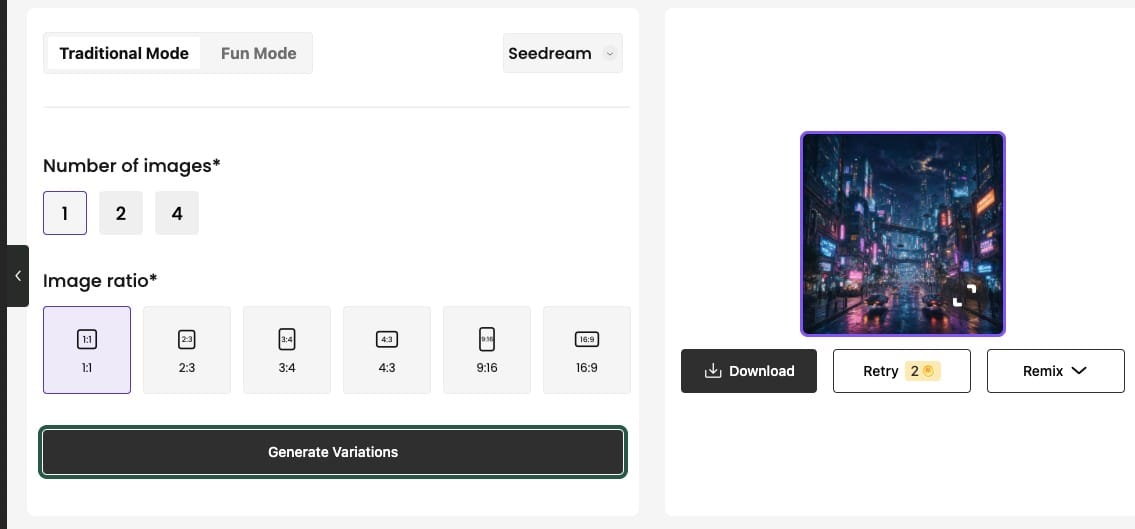
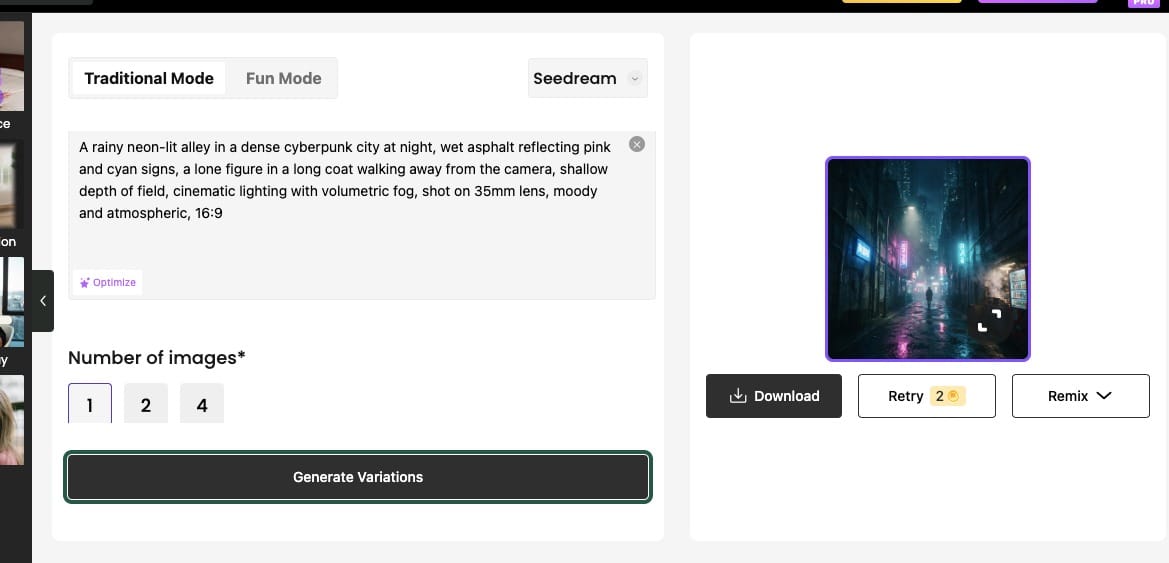
Large visual models work by predicting the most probable next elements based on the patterns in their training data. A short, generic prompt activates the most common, average patterns. A detailed prompt narrows the possibilities and steers the model toward the specific outcome you have in mind. Check the prompts below and what MagicCanvas generated based on these prompts
Weak image prompt:
“A cool cyberpunk city at night.”
Stronger version:
“A rainy neon-lit alley in a dense cyberpunk city at night, wet asphalt reflecting pink and cyan signs, a lone figure in a long coat walking away from the camera, shallow depth of field, cinematic lighting with volumetric fog, shot on 35mm lens, moody and atmospheric, 16:9.”
Weak video prompt:
“Make a video of a product spinning.”
Stronger version:
“Slow orbital camera move around a matte black ceramic coffee dripper on a marble surface, soft studio lighting with gentle highlights, product remains sharp and centered, subtle steam rising, clean minimal background, 6-second seamless loop, photorealistic product video style.”The second versions give the model clear decisions to make instead of forcing it to invent everything.
Building Better Image Prompts
Start with the subject. Add the most important visual attributes early. Then layer environment, lighting, composition, and style.Useful building blocks:
- Subject details: age range, clothing, expression, pose, materials, textures
- Environment: location, time of day, weather, background elements
- Lighting: golden hour side light, soft diffused studio light, dramatic rim lighting, neon glow, overcast natural light
- Camera and composition: close-up, medium shot, wide establishing shot, low angle, rule of thirds, shallow depth of field, 85mm lens
- Style and mood: photorealistic, cinematic, editorial fashion, concept art, watercolor illustration, high-key commercial, desaturated film look
- Technical: aspect ratio (1:1, 16:9, 9:16), level of detail, color palette
Example – product photography
“Matte black wireless earbuds on a clean white surface, three-quarter view, soft diffused key light from the left with subtle fill, sharp focus on the product, minimal reflections, high-end commercial product photography, 4:5 aspect ratio.”Example – character concept
“A 30-year-old woman with short silver hair and a weathered leather jacket standing on a windswept cliff at dusk, determined expression looking toward the horizon, dramatic side lighting with long shadows, cinematic wide shot, cool blue and amber color grade, photorealistic.”Notice how each prompt answers the four parts without sounding robotic.
Writing Prompts for Video
Video adds the dimension of time and motion. A strong still prompt is a good starting point, but you must also describe how things move and how the camera behaves.Key additions for video:
- Main action or motion of the subject
- Camera movement (slow dolly in, gentle pan left to right, orbital move, handheld follow, static locked-off shot)
- Pacing and duration (slow and deliberate, 5–8 seconds, seamless loop)
- Consistency notes (keep the face and clothing identical, maintain the same lighting)
- What should stay still versus what should move
When you already have a strong still image, image-to-video prompts work best when they focus on motion rather than re-describing everything the image already shows.Example – image-to-video
“Turn this portrait into a 6-second cinematic clip. Keep the face, hair, and clothing exactly the same. Add a very slow subtle push-in of the camera, soft natural movement of hair in a light breeze, gentle shift of light across the face, calm and intimate mood, photorealistic.”Example – text-to-video
“A young chef in a white apron carefully plating a colorful dish in a modern open kitchen, warm morning light streaming through large windows, slow tracking shot from left to right at counter height, natural and unhurried movement, soft depth of field, documentary-style food video, 8 seconds.”Avoid stacking too many competing actions or camera moves in a single short clip. One clear subject action + one camera move usually produces more coherent results.
Practical Tips That Consistently Improve Results
Be specific about the good, not just the bad.
Telling the model “no blurry, no extra fingers, no distorted face” can help, but positive direction is usually stronger. Describe the sharp focus, natural hands, and accurate anatomy you want.Use real cinematography and photography language.
Words like “85mm,” “shallow depth of field,” “rim light,” “dolly-in,” and “golden hour” activate more precise visual patterns than vague adjectives like “beautiful” or “epic.”Iterate instead of chasing the perfect first prompt.
Generate a few variations. Then refine: “Make the lighting warmer,” “Pull the camera back slightly,” “Keep everything the same but change the background to a rainy street.” Platforms that let you compare outputs side by side and regenerate quickly turn this process from frustrating to creative.Match the prompt length to the task.
Simple subjects often work with shorter prompts. Complex scenes or specific styles benefit from more detail. Extremely long prompts can dilute the signal—clarity beats volume.Consider the end use.
A prompt for an Instagram Reel (vertical, punchy, short) should differ from one for a cinematic hero shot or a product detail page. Mention the intended use when it affects framing or pacing.Test across models when possible.
Different models have different strengths. Some excel at photorealism and text, others at stylized motion or consistent characters. A good prompt often transfers well, but small adjustments can unlock better results on a specific model.
Putting It Into Practice on a Modern Platform
The framework above works with any capable image or video model. It becomes especially powerful when you can generate multiple variations, refine them, convert strong stills into motion, and chain editing steps without leaving the same workspace.That is the practical advantage of a canvas-style platform. You can write a solid prompt, explore different interpretations, pick the strongest result, turn it into video with a focused motion prompt, then further edit backgrounds, objects, or faces—all while keeping the creative thread intact. The better your initial description, the less cleanup and the more intentional the final piece feels.
Your Turn
Pick one image or short video you actually need this week—a product shot, a social post, a concept frame, or a simple animated moment.Spend two minutes filling in the four parts:
- What is the subject and what is it doing?
- Where is it and what is the atmosphere?
- How should the camera, lighting, and style look?
- What must stay consistent or be avoided?
Run it. Look at the result. Then adjust one element at a time.You will quickly see that the difference between “AI-generated” and “this actually works for my project” is rarely the model. It is how clearly you brief it.Clear prompts do not just produce better pictures and videos. They turn AI from a slot machine into a reliable creative partner. And once you internalize the simple structure, you can move faster, waste fewer generations, and spend more time on the ideas that matter.The tools are ready. The quality is now largely in your hands—one well-written prompt at a time.
FAQs
What is the four-part framework for writing better AI image and video prompts?
An effective prompt covers Subject and Action, Context and Setting, Style/Composition/Technical Direction, and Constraints. This simple structure helps the model understand exactly what you want instead of guessing.
Why do vague prompts produce mediocre results?
AI models predict the most common patterns from their training data. Short or generic prompts trigger average outputs. Specific details about subject, lighting, camera, motion, and style narrow the possibilities and deliver more intentional results.
How should video prompts differ from image prompts?
Video prompts need clear direction on motion and camera movement (for example, slow dolly-in or orbital shot) in addition to the subject and setting. When starting from a still image, focus the prompt on what should move and what must stay consistent.
Do I need long, complicated prompts to get good results?
No. Clarity and specificity matter more than length. A well-structured few sentences that cover the four key parts usually outperform long, unfocused descriptions.
How can I improve results through iteration?
Generate a few variations, then refine one element at a time (lighting, camera angle, motion, or consistency). Platforms that support side-by-side comparison and quick regeneration make this process efficient.