

I’ve spent the last decade making videos the hard way. You know the drill: open Premiere, stare at a timeline that looks like a crime scene, realize the lighting is garbage, re-shoot three times, then spend four hours color-grading something that still looks like it was filmed inside a potato. By the time I hit export, I’ve aged approximately six years and developed a mild hatred for my own face.Then I found MagicCanvas.I’m not going to pretend I was hunting for the next big AI tool with some noble creative vision. I was bored, scrolling, and the little purple logo kept showing up. “AI Video,” it said. I rolled my eyes so hard I almost strained something. Another “revolutionary” AI video generator promising Hollywood results with zero effort, right? I’d seen that movie before. Literally. And the special effects were usually worse than the ones in the actual movie.But curiosity is a dangerous drug, so I clicked.
The Moment Everything Went Sideways
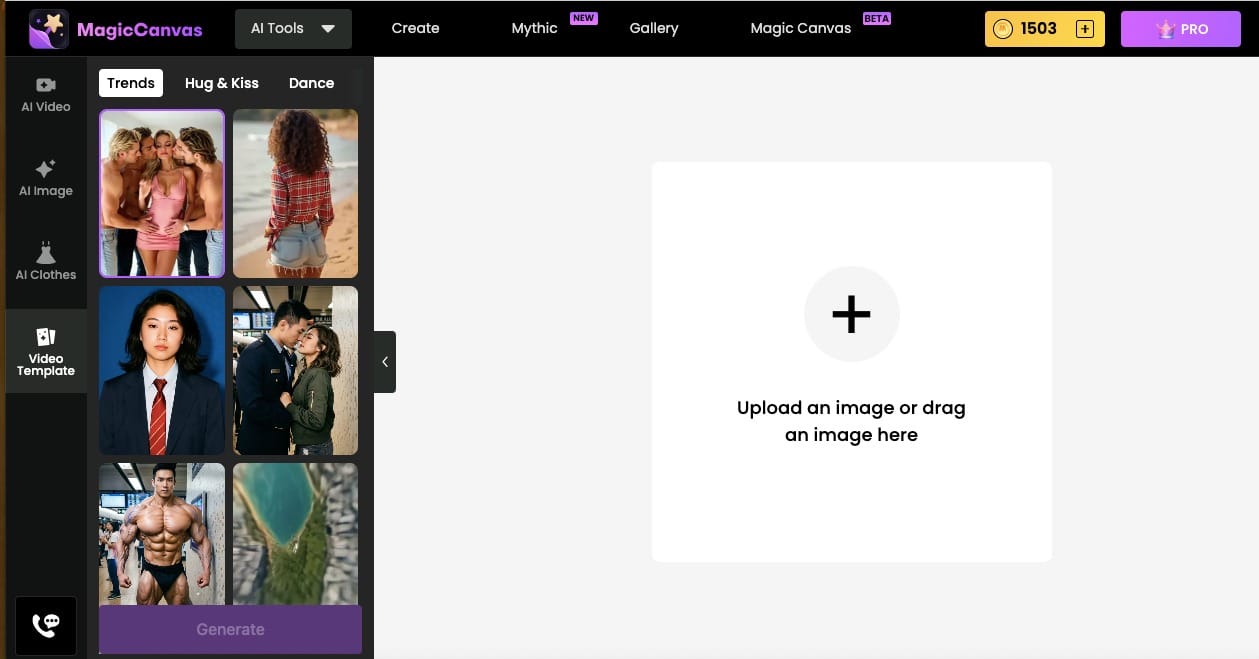
MagicCanvas doesn’t feel like most AI video tools. A lot of them throw you into a blank prompt box and dare you to write something coherent. MagicCanvas feels more like someone left the creative toys out on the floor and said, “Go ahead, make a mess.”On the left side you’ve got the usual suspects: AI Video, AI Image, AI Clothes. Useful, sure. But the thing that actually hooked me—the part that made me cancel plans and stay up until 2 a.m. like a teenager discovering the internet for the first time—was Video Template.This section is pure chaos in the best possible way.
Video Templates: Where Dignity Goes to Die (Happily)
I started with the “Trends” tab because, well, I like to pretend I’m still culturally relevant. Then I noticed “Hug & Kiss.” Of course I clicked it. Within about thirty seconds I had generated a video of two people who looked vaguely like my friends locked in an extremely enthusiastic hug that somehow also involved a kiss and what I can only describe as interpretive wrestling. The physics were slightly off in the most charming way. One person’s hair decided to float like it was underwater. The other person’s jacket kept trying to escape the frame. It was ridiculous. It was also weirdly emotional. I watched it three times and laughed harder each time.
Then came “Dance.”I fed it a still photo of myself looking vaguely professional (mistake number one) and asked for a dance video. What came back was me—or a slightly more coordinated version of me—doing something between a TikTok challenge and a seizure in a nightclub. The background changed mid-video. At one point I was somehow on a beach. At another point there were lights that belonged in a music video from 2007. I sent it to three friends. Two of them replied with the crying-laughing emoji. One just said “I hate you” and then asked how I made it.That’s when I realized MagicCanvas’s Video Templates aren’t trying to be perfect. They’re trying to be fun. And in a world where every other AI tool is desperately trying to look “cinematic” and “professional,” pure fun feels almost rebellious.
Then I found the mermaid one.Yes. Mermaid transformation.I uploaded a photo of myself standing on a dock (normal human, legs, shoes, the whole tragic package) and selected the mermaid effect. Thirty seconds later I was watching a version of myself with an iridescent tail, floating in crystal-clear water, looking like I’d just been cast in a low-budget but high-ambition fantasy series. My facial expression somehow stayed the same—slightly confused, slightly amused—which made the whole thing even funnier. I showed my partner. She stared at the screen for a long time and then said, very quietly, “We’re never going back to normal videos, are we?”No. We are not.
Why These Templates Actually Matter
Here’s the thing most “AI video” articles won’t tell you: the technical quality is only half the battle. The other half is whether you want to keep using the tool after the novelty wears off.MagicCanvas’s Video Templates win on the second half. They remove the blank-page terror. Instead of staring at a prompt box wondering if you should write “cinematic tracking shot of a woman walking through rain while looking wistfully at the camera,” you just pick “Hug & Kiss” or “Dance” or “Mermaid” and go. The templates give you a starting point that already has personality. You can still tweak, still prompt, still get creative—but you’re not starting from zero.I’ve used them to:
- Turn boring product shots into short, playful social clips
- Make birthday videos for friends that actually feel personal instead of stock-footage generic
- Create content for a side project in an afternoon instead of a weekend
- Waste an embarrassing amount of time turning every photo of my dog into various magical creatures (the mermaid dog remains a high point of my creative career)
And because the templates are organized into clear categories—Trends, Hug & Kiss, Dance, and whatever new madness they’re cooking up—you don’t have to dig through endless menus. You open the app, you see the options, and you start playing.
The Rest of the Toolkit (Because I Can’t Stop)
Once the Video Templates had me fully hooked, I started poking around the other features. The AI Video section lets you generate longer, more controlled clips from text or images. AI Image is solid for generating stills you can then feed back into the video tools. AI Clothes is exactly as chaotic as it sounds—upload a photo, change the outfit, watch the model try to keep a straight face while wearing something that belongs in a fashion experiment.But I keep coming back to the templates. They’re the gateway drug. Everything else is just the dealer expanding the menu once you’re already addicted.
A Few Things I Learned the Hard Way
- Start simple. The first time I tried to over-prompt a Hug & Kiss video, I got something that looked like a Renaissance painting having a nervous breakdown. Less is more until you understand the tool’s personality.
- The results are better when you lean into the absurdity. MagicCanvas seems to reward playfulness. If you ask it to make something “professional and serious,” it will try, but the magic lives in the slightly unhinged results.
- Save everything. You’ll generate something ridiculous, laugh, move on, and then three days later realize it would be perfect for a client or a social post. Ask me how I know.
- The mermaid effect works on almost anything. Humans, pets, even that one photo of your coworker looking extremely done with the meeting. Use this knowledge responsibly. Or don’t. I’m not your supervisor.
Why This Feels Different from Other AI Video Tools
Most AI video generators right now are racing to look like they belong on a serious production pipeline. That’s fine. Some people need that. I needed something that made me want to open the app when I had ten free minutes and zero inspiration.MagicCanvas does that. The Video Template section especially feels like it was designed by people who actually enjoy making weird, joyful content instead of people who only care about photorealistic lighting and perfect motion consistency. The motion isn’t always perfect. Sometimes the physics are a little dream-like. Sometimes hair does things hair shouldn’t do. I don’t care. The emotional payoff is higher.I’ve used it for work. I’ve used it for pure nonsense. I’ve used it at 1 a.m. when I should have been sleeping. And every single time, I end up smiling at the screen like an idiot.
The Part Where I Get Slightly Serious
AI video is moving ridiculously fast. Six months from now the tools will be better, the motion will be smoother, the templates will be more sophisticated. That’s inevitable. What’s not inevitable is tools that stay fun while they get better.MagicCanvas currently sits in a sweet spot: powerful enough to make real content, playful enough that you don’t feel like you’re operating industrial equipment. The Video Templates—Hug & Kiss, Dance, the mermaid transformations, the trend-driven options—are the clearest proof of that philosophy. They’re not trying to replace traditional video editing. They’re trying to make the first step so enjoyable that you actually take it.If you’ve been curious about AI video but felt overwhelmed by the blank prompt or underwhelmed by stiff, overly polished results, try the templates first. Pick something stupid. Make yourself a mermaid. Make your friend dance in a way that violates several laws of physics. Make two people hug so enthusiastically that the background starts to question its life choices.You might lose an hour. You might lose a whole evening. You might also remember why you started making videos in the first place: because it’s fun when it works, and even funnier when it doesn’t quite.I’m still here, still generating mermaid versions of everyone I know, still slightly sleep-deprived, and still not going back to the old way of doing things.Your move.
FAQs
What is MagicCanvas and why is it different from other AI video tools?
MagicCanvas is an AI-powered creative platform that makes video generation feel more like playing than working. Instead of forcing you to start with a blank prompt, it offers ready-to-use Video Templates (Hug & Kiss, Dance, mermaid transformations, and more) that already have personality and motion built in. The results are often playful and slightly imperfect in the best way—exactly the opposite of the stiff, overly polished clips many other AI video tools produce.
Can I really create fun videos without any editing experience?
Yes. The Video Template section is designed for exactly that. You pick a style (like Hug & Kiss or Dance), upload a photo or use a prompt, and the tool handles the rest. You don’t need to understand timelines, keyframes, or lighting. Most people generate their first clip in under a minute.
What kinds of effects can I try in the Video Templates?
Popular ones include Hug & Kiss (enthusiastic, slightly chaotic embraces), Dance (everything from smooth moves to gloriously uncoordinated chaos), mermaid transformations, and various trending effects. New templates are added regularly, so the playground keeps expanding.
Is MagicCanvas only for fun, or can I use it for real work?
Both. People use the templates for social media clips, birthday videos, product teasers, and side-project content. The playful style often performs better on social platforms than overly serious, “cinematic” AI videos.
Do the videos look realistic?
They look fun and lively more than hyper-realistic. Motion can be dreamy or slightly off in charming ways (floating hair, unexpected background shifts). If you want perfect photorealism every time, other tools may suit you better. If you want videos people actually smile at, MagicCanvas delivers.