
Most advice about social media advertising makes it sound easy. Just create a great video, find your audience, launch a campaign, and watch the sales roll in.
There's just one small problem: all of that costs money.
For small businesses, independent creators, and online store owners, the challenge isn't simply finding people to show ads to. It's paying for the creative work, testing different ideas, and learning what actually works without burning through the entire budget.
That's where AI can help.
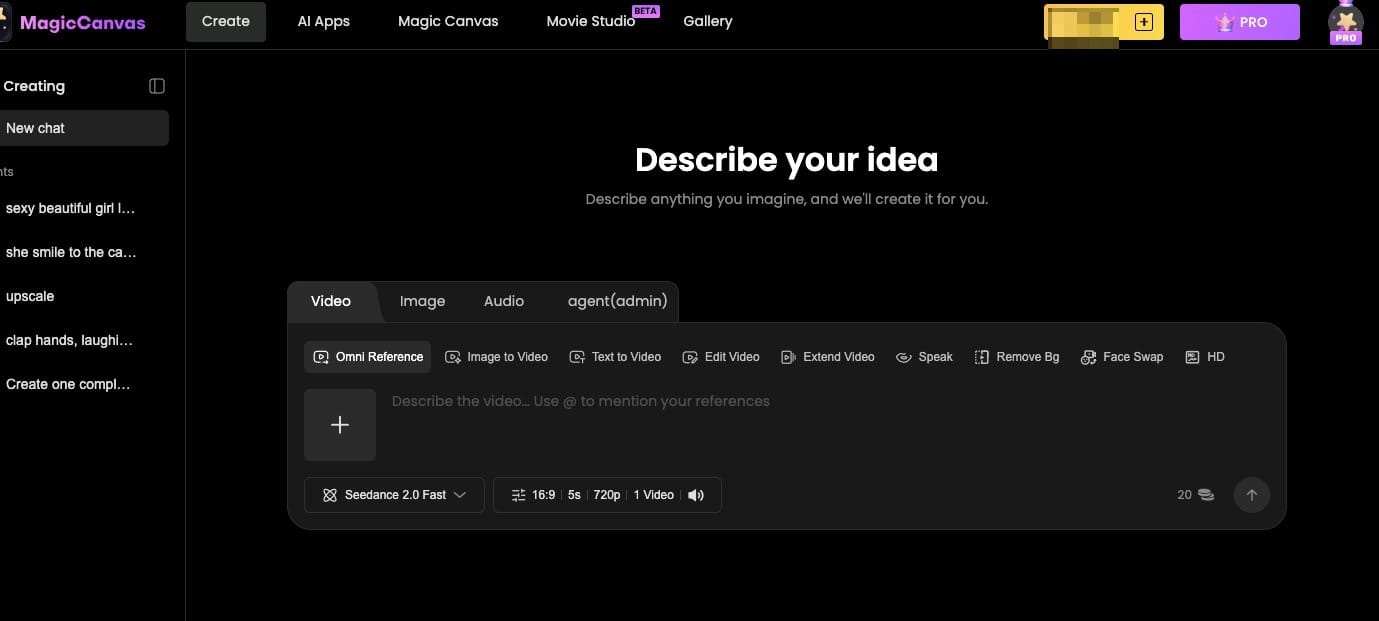
AI video tools make it easier to turn ideas, text prompts, and existing images into video content. Instead of organizing a new shoot every time you want to try a different ad, you can explore creative variations with tools like MagicCanvas.
But here's the important part: AI doesn't automatically make advertising profitable. It makes experimentation more accessible. You still need a clear message, a sensible budget, and a way to measure results.
In this guide, we'll cover how to make social media ads with AI on a budget, where your money actually goes, how to create affordable video ads, and what to do when your budget is too small to generate useful results.
1. What a Small Advertising Budget Really Changes
When money is tight, every advertising decision matters a little more.
A large brand might afford to test ten creative concepts, hire multiple creators, and keep spending while its marketing team analyzes the results. A small business usually has to make more careful choices.
That doesn't mean small businesses can't compete. It means they need to spend differently.
Three problems tend to appear when advertising budgets are limited.
Too Many Campaigns, Not Enough Data
Imagine you have $300 to spend on advertising this month. You decide to promote three products on two platforms, with four different audience groups for each product.
Suddenly, your budget is spread across a dozen different combinations.
Each one receives very little spending, and you may struggle to figure out which audience, product, or creative actually performed best.
A better approach is to simplify. Start with one primary goal, one main offer, and a focused campaign structure. Give your strongest idea a reasonable opportunity to perform before adding more complexity.
The right setup depends on your platform, campaign objective, and conversion volume, but the principle is straightforward: don't divide a small budget into so many pieces that none can teach you anything useful.
Not Enough Creative Variety
The second problem is creative fatigue.
Even a good advertisement can lose its impact when the same people see it repeatedly. If you only have one video, your options are limited when performance begins to decline.
Traditionally, creating another video might mean finding a creator, arranging a shoot, editing footage, and waiting for the finished asset.
AI can reduce that production burden. You can explore alternative hooks, scenes, visual styles, and video concepts without rebuilding every asset from scratch.
This is one of the most useful advantages for small advertisers: you can put more effort into testing your message instead of spending all your resources producing one perfect video.
Production Costs Eat Into the Budget
Your advertising budget isn't just the money paid to Meta, TikTok, or another platform.
You may also pay for video production, graphic design, editing, software subscriptions, and outside marketing support.
If those costs consume most of your available budget, you have very little left to test the ads themselves.
That's why it's useful to think about your total advertising cost, not just your media spend.
2. Where Does Your Advertising Budget Actually Go?
Before trying to reduce costs, identify what you're paying for.
| Cost category | What it covers | How to control it |
|---|---|---|
| Media spend | Money paid to advertising platforms | Start with a focused campaign and a clear objective |
| Creative production | Video shoots, creators, editing, and design | Reuse assets and explore AI-generated visuals |
| Software | AI tools, editing apps, and subscriptions | Start with tools you actually need |
| Management | Agency fees or outsourced campaign work | Keep the workflow simple and handle manageable tasks in-house |
| Testing | New concepts, hooks, and creative variations | Test a few meaningful alternatives rather than dozens at once |
The exact cost breakdown varies by business. Some companies already have an in-house designer, while others need help with almost everything.
However, creative production is often a practical place to look for savings because it can require repeated spending.
For example, suppose you want to test three different advertising concepts. With traditional production, you might need to commission three separate videos. With AI, you may be able to create some of the supporting visuals yourself, using existing product photos and text prompts.
That doesn't make every video free. AI tools may charge subscription fees or generation credits, and some projects still need professional filming. But it can give you another way to produce creative assets without paying for a full shoot every time.
3. How AI Changes Advertising for Small Businesses

The real benefit of AI isn't simply having another tool in your marketing stack. It's being able to produce and test creative ideas with fewer resources.
Create More Ideas Before Spending More Money
Let's say you run a small online store selling reusable water bottles.
You could advertise the same product from several angles:
- Convenience: a bottle that's easy to carry throughout the day.
- Lifestyle: staying hydrated during work, travel, or exercise.
- Design: highlighting the product's appearance and colors.
- Gifting: presenting the bottle as a practical gift.
These are different marketing messages for the same product.
AI writing tools can help you brainstorm scripts and hooks. AI video generation can help you explore different visual concepts. You can then choose a small number of promising variations to test.
The key is to change something meaningful between versions. Making ten videos with slightly different backgrounds won't necessarily teach you as much as testing three distinct messages.
Reduce Dependence on Expensive Production
Not every advertising concept needs a studio, a camera operator, and a full production team.
Some concepts can be communicated with a product image, a generated scene, simple motion, and clear text.
For example, a candle business might use Image to Video to turn an existing product photo into a short lifestyle scene. A service business might use Text to Video to explore a visual concept that would otherwise require filming.
You still need to review the output, edit the final video, and ensure that any product claims are accurate. But AI can help reduce the amount of manual production required.
Make Creative Testing More Practical
A small team often has limited time as well as limited money.
AI can help speed up brainstorming and asset creation, allowing you to spend more time evaluating ideas and improving your ads.
It won't tell you with certainty which creative will win. That depends on your audience, offer, platform, and campaign conditions.
Think of AI as a way to make more informed experiments possible, not as a guarantee of better results.
4. How to Make Social Media Ads with AI: A Step-by-Step Workflow
You don't need a complicated production process to get started. Here's a practical workflow for creating a short social media ad on a limited budget.
Step 1: Pick One Product and One Goal
Start with a single product, service, or offer.
Then decide what you want your ad to achieve. Are you trying to generate sales, attract website visitors, collect leads, or introduce your brand to new customers?
Choose one main goal and make the message fit it.
For example, if you're promoting a new desk lamp, your ad could focus on creating a more comfortable workspace. You don't need to explain every product specification in the same video.
Step 2: Write a Short Script
For a 15–30-second ad, use a simple structure:
- Hook: Capture attention with a question, problem, or interesting visual.
- Benefit: Explain why the product or service matters.
- Demonstration: Show how it works or how it fits into everyday life.
- Call to action: Tell viewers what to do next.
Here's a fictional example for a desk lamp:
Hook: "Still working under terrible lighting?"
Benefit: "Give your workspace a more comfortable feel."
Demonstration: Show the lamp illuminating a desk during an evening work session.
Call to action: "Explore the collection and find your setup."
Use AI to generate alternative hooks if you need ideas, but rewrite anything that sounds unnatural. The goal is to communicate with real customers, not to impress another AI tool.
Step 3: Choose the Right Visual Approach
You have three main options.
Use existing footage. If you've already filmed the product, use that footage wherever possible. Real demonstrations can help people understand what they're buying.
Turn images into video. If you have product photos but little video content, use Image to Video to explore movement, camera effects, and atmosphere.
Generate scenes from text. If you need a new visual concept, Text to Video can help you explore a scene from a written description.
MagicCanvas offers Text to Video and Image to Video workflows that can support these creative approaches. For small businesses, they provide ways to experiment with video ideas without relying entirely on traditional filming.
For example, you could start with an existing photograph of your desk lamp and use a prompt like this:
"Create a short, modern lifestyle video using the supplied desk lamp photograph. Show the lamp illuminating a tidy home office in the evening, with a subtle camera push-in and natural-looking lighting. Keep the lamp's original shape, color, and design consistent. Use a clean composition suitable for a vertical social media advertisement."
Review the generated result carefully. If the lamp's design changes or the lighting looks unrealistic, adjust your prompt or try another generation.
For physical products, accuracy matters more than visual spectacle.
Step 4: Create Two or Three Creative Variations
Don't spend your entire budget polishing one concept before you've learned whether the message resonates.
Instead, create a few variations that test different ideas.
For the desk lamp, you could try:
- Version A: Focus on evening productivity.
- Version B: Focus on creating a cozy home office.
- Version C: Focus on the lamp's design and appearance.
You can use the same product images and basic production workflow while changing the script, scene, or opening hook.
MagicCanvas can help you explore different visual treatments using text prompts or existing images. The precise workflow will depend on the footage and features available to you.
Keep your first test manageable. Two or three distinct versions are often easier to compare than a large batch of ads created without a clear testing plan.
Step 5: Edit for the Platform
Before publishing, make sure the video fits the platform and communicates its message quickly.
For TikTok, Instagram Reels, and YouTube Shorts, vertical 9:16 video is a useful starting point.
Check that:
- The opening gives viewers a reason to keep watching.
- The product or main message appears clearly.
- Text is readable on a phone.
- Important information isn't covered by interface elements.
- The call to action is easy to understand.
You don't need elaborate transitions or constant movement. A clean, well-paced video with a clear message can be more effective than a visually complicated one that leaves viewers confused.
Step 6: Launch a Small, Focused Test
Choose a campaign structure that fits your available budget and objective.
Avoid launching several campaigns, audience groups, and unrelated offers simultaneously if you cannot afford to gather meaningful data from each one.
Give your test a defined budget and evaluation period. Decide in advance which metrics matter, and avoid changing everything every few hours.
If the goal is website sales, for example, views alone won't tell you whether the ad is working. You also need to examine clicks, conversions, and acquisition costs.
Step 7: Use the Results to Improve the Next Version
Once you have enough data to evaluate the test, look for useful patterns.
Did one hook attract more clicks? Did another version generate views but few visits? Did people click through but fail to purchase?
Each result points toward a different possible improvement.
You might need a clearer opening, a stronger offer, more accurate product visuals, or a better landing page. Don't automatically blame the video when other parts of the customer journey may be responsible.
The objective isn't to create more ads forever. It's to use each round of testing to make the next round more informed.
5. How to Choose AI Advertising Tools on a Limited Budget
You don't need to pay for every tool that promises to automate marketing.
Start by identifying the task that's slowing you down most.
If You Have No Software Budget
Use the free features available in tools you already have. Write scripts with tools you can access, create simple edits with an existing video editor, and study competitor advertisements using publicly available ad libraries.
You can also test organic content before committing money to paid promotion.
The objective is to find a promising message before adding unnecessary subscriptions.
If Video Production Is Your Biggest Expense
Consider an AI video creation tool that fits the kind of content you need.
MagicCanvas is worth exploring if your workflow involves generating video from text prompts or animating existing images. It can help you test creative concepts without depending entirely on new footage.
Before paying for any tool, check its current pricing, generation limits, export options, and commercial-use terms. The cheapest subscription isn't always the cheapest workflow if it doesn't support the output you need.
If Campaign Management Is the Main Problem
Creative generation and advertising management are different tasks.
An AI video tool can help create assets, but that doesn't automatically mean it can launch campaigns, allocate ad spend, or optimize performance.
If campaign management is your main bottleneck, evaluate the automation features offered by your advertising platform or consider whether you need additional management support.
Choose tools based on the job you need done, rather than paying for a large collection of features you may never use.
6. When Is Your Advertising Budget Too Small?
This is the question many marketing guides avoid.
There isn't one universal minimum budget that guarantees an advertising campaign will work. The amount you need depends on your product price, conversion rate, cost per conversion, campaign objective, and the platform you're using.
However, a budget can be too small to produce reliable conclusions.
Imagine you spend $30 on an ad and receive no sales. That doesn't necessarily prove the creative is bad. You may have received too few relevant visitors to judge it fairly.
Likewise, one sale from a small test doesn't prove the ad will remain profitable as you spend more.
If your budget is very limited, consider these options:
Optimize for a more attainable goal. If purchases are too infrequent to evaluate, a higher-funnel metric such as qualified website visits may help you assess early interest. Just remember that engagement or traffic doesn't guarantee sales.
Concentrate your efforts. Avoid spreading your budget across too many products, audiences, and campaigns.
Test organically first. Publish different creative concepts on your social accounts and observe which ones attract meaningful attention. Organic performance isn't a perfect predictor of paid results, but it can provide useful early feedback.
Improve the offer and landing page. More advertising isn't always the answer. If visitors don't understand your product, trust your business, or see a compelling reason to buy, producing additional videos may not solve the problem.
The goal is to collect useful information without spending more than you can afford to lose.
7. How to Measure Whether Your AI Ads Are Working
Your evaluation should match your campaign objective.
| Metric | What it tells you |
|---|---|
| Views and watch time | Whether people are watching the video |
| Click-through rate | Whether viewers are interested enough to click |
| Cost per click | How much you pay for each click |
| Conversion rate | How often visitors complete the desired action |
| Cost per acquisition | How much it costs to generate a customer or other conversion |
For a sales campaign, calculate your costs against the actual value of the sales generated. A low cost per click is not automatically good if those clicks never lead to purchases.
Also, separate creative production costs from media spend. AI may help reduce the cost of producing each asset, but your advertising platform will still charge for delivery.
Track both costs so you can evaluate the overall economics of your campaign.
8. Common Mistakes When Making AI Ads on a Budget
Generating too many variations too early. More creative assets aren't useful if you don't have enough budget or traffic to evaluate them. Start with a small number of meaningful differences.
Using generic AI visuals. Beautiful visuals can still feel disconnected from your brand. Use real product references and consistent messaging wherever possible.
Ignoring product accuracy. Check packaging, labels, features, and claims. Never let an AI-generated scene misrepresent what customers will actually receive.
Paying for tools before understanding your workflow. Start with the task that costs you the most time or money, then choose a tool that addresses it.
Expecting AI to guarantee results. AI can reduce production effort and help you test ideas. It cannot guarantee profitable campaigns, strong conversion rates, or viral videos.
Forgetting the rest of the customer journey. An ad is only one part of the process. Your offer, landing page, pricing, customer experience, and checkout all matter.
Frequently Asked Questions
Can you run social media ads with AI on a small budget?
Yes. AI tools can help you create scripts, generate visuals, and develop different ad variations at a lower production burden. However, you still need a realistic media budget and a clear way to measure results. AI reduces some production constraints, not every advertising cost.
How much does it cost to make AI video ads?
The cost depends on the tools you use, the number of generations, editing requirements, and whether you need paid assets or professional review. Some tools offer free access or trial credits, while others require subscriptions or charge based on usage. Check current pricing and export limits before planning your production budget.
Can MagicCanvas help create social media ads?
MagicCanvas offers Text to Video and Image to Video workflows that can help you explore advertising concepts, generate video scenes, and animate existing images. You can use these capabilities to create supporting visuals for short-form social content. Always review the output and confirm that the final video meets your platform and commercial-use requirements.
Should I create multiple ads or spend more on one ad?
It depends on your budget and the amount of data you can collect. Testing a small number of meaningfully different creatives can help you discover which message resonates. But creating too many versions can spread your budget too thin. Start with a manageable test and expand based on what you learn.
What if my ads get views but no sales?
Check the entire customer journey. Review whether viewers are clicking, whether the landing page matches the ad, whether the price and offer are competitive, and whether the checkout process works smoothly. Views indicate exposure, not purchase intent. You may need to improve the message, the offer, the landing page, or the campaign targeting.
Is AI advertising better than hiring a creator?
Neither approach is automatically better. AI can help you produce creative variations and supporting visuals efficiently. Creators can bring real experiences, personal credibility, original demonstrations, and an established audience. Depending on your campaign, a combination of AI-generated content and authentic creator footage may be the most practical option.
Final Thoughts
Running social media ads on a limited budget isn't about finding a magical tool that makes every campaign profitable.
It's about deciding where your money matters most.
Keep your campaign structure manageable. Avoid unnecessary production expenses. Create a few meaningful creative variations, measure the results, and use what you learn to improve the next round.
AI can make that process more accessible by helping you turn ideas and images into video content without relying entirely on traditional production. With MagicCanvas, you can explore Text to Video and Image to Video as part of that creative workflow.
Start with one product, one clear message, and a small test you can afford. Don't spend money just to produce more content. Spend it to learn what your audience responds to.
Because the real advantage of AI isn't simply making ads cheaper. It's giving small businesses more room to experiment, learn, and make better creative decisions without needing a massive marketing budget.